

|
Diligence for Excel |
|
Additional Tools: Worksheet Protection
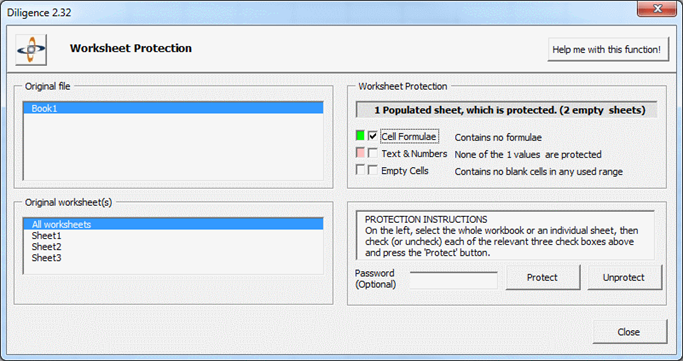
The Worksheet Protection function allows you to view protection settings and then protect or unprotect key features in any or all worksheets.
The current protection status is initially shown for the active workbook. It displays how many of the worksheets are protected and whether a password has been used. You may select other open workbooks, or check/change the protection of individual sheets within any open file. A Red/Amber/Green protection status is given for the three categories of cells that can be protected; Formulae, Cells containing Text or Numbers and Blank Cells. You can protect any combination of these three sections for any or all worksheets, by selecting their corresponding check-boxes and pressing the ‘Protect’ button. In the example to the left the user is about to protect all cells containing Text or Numbers. Once the ‘Protect’ button is pressed the RAG status for this section would change to green. Passwords can be used to enforced the protection if required. Please note that it is entirely deliberately that this function simply applies Excel’s own sheet protection to the file, and no additional security or data is added. This means that at any time, any user can subsequently unprotect or re-protect cells in the worksheet using Excel’s standard ribbon, together with the password, if applicable.
Important Notes If formulae/text or numbers are SUBSEQUENTLY added to a sheet with protection, the new items will NOT be protected. The protection must be re-run for that sheet. The Table of Contents sheet is excluded from this form and its protection / un-protection functions Workbook level protection (to open the file or open with particular privileges are NOT handled by this function. Workbook level protection can be set by pressing the 'SaveAs' button in Excel and then pressing the 'Tools' dropdown from the Save dialog box.
Tell me more about the Formula Map Worksheet …
|
|
Light touch, Audit quality spreadsheet compliance & governance. |
